
AI Video Generator: 3D FlixAI
Tresor TechArt & Design
3.0446.00 Reviews
- Version
- 1.3.4
- Installs
- 10.00M
- Age Rating
- Everyone
Screenshots

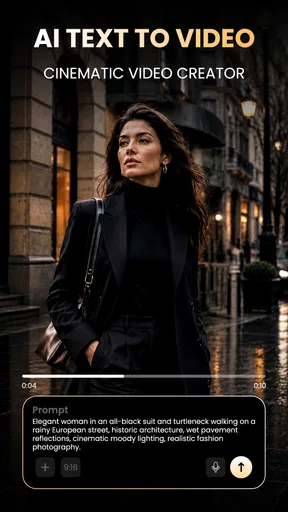
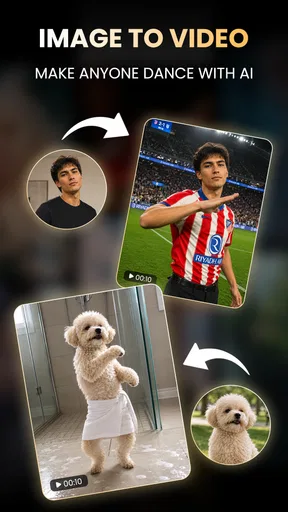
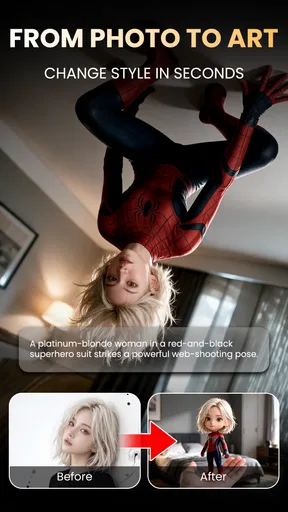
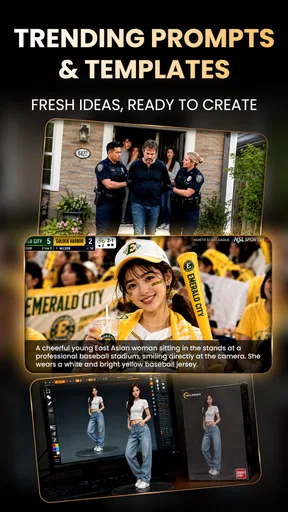
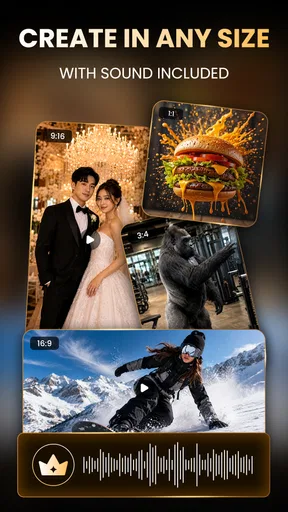


Our Review of AI Video Generator: 3D FlixAI
 Analysis by Appyee
I’d approach AI Video Generator: 3D FlixAI as a quick creative experiment rather than a pocket-sized film studio. The idea is appealing: use AI to turn a visual prompt or photo into something stylized, then see whether the result fits a social post, mood board, or playful personal project. That can be a satisfying shortcut when I have an image in mind but no time or skill for conventional 3D work. The important trade-off is that fast generation does not automatically mean precise control or a polished result.
What “fast” should mean in practice
Tresor Tech’s art-and-design app is free to download, with in-app purchases, and its current version is 1.1.8. It is rated for Everyone and requires Android 7.0 or later. Those details make it easy to try on a compatible device, but I would not treat the one-tap premise as a promise that every finished image or clip will appear instantly. AI creation still involves a generation step, and the practical wait can depend on the request and the device or service handling it.
I find it useful to separate quick to start from quick to finish. Choosing a broad style such as anime or 3D may take little effort; getting a result that matches a specific person, object, or composition can take more attempts. If I need a dependable visual for a deadline, I would leave room to review and redo it rather than build a schedule around an instant outcome.
When a creative session gets demanding
The app makes most sense for short, low-stakes bursts: trying a few looks for a profile image, turning a pet photo into a more imaginative variation, or making a visual to share with friends. These are forgiving tasks. If one version looks odd, I can treat it as part of the experiment rather than a failed production job.
A more demanding session is different. Reworking the same source repeatedly to chase a particular face, pose, or background can become a cycle of small adjustments and fresh generations. A practical tip is to decide what matters most before starting: perhaps the subject should remain recognizable, while the setting and style can change. That gives me a clearer way to judge results and avoids spending time trying to perfect every detail at once.
For a small business graphic, a school project, or anything that needs consistent characters across several images, I would test the app with a disposable idea first. A single appealing result does not prove that later generations will keep the same look. When consistency matters more than surprise, a conventional design or illustration tool may be the safer choice.
Reliability and the value of a second look
AI output is inherently less predictable than editing a fixed image with ordinary controls. A generation can be attractive but still miss the point, especially when the request combines several details. I would inspect the whole result before sharing it: check faces, hands, lettering, edges, and any object that needs to be recognizable. The more important the image is, the less I would rely on a quick glance.
There is also a difference between an app being easy to open and a workflow being dependable. For casual play, an imperfect attempt is usually harmless. For content that must be delivered on time, I would keep the original image and any finished exports somewhere accessible, and avoid assuming that an unfinished generation can always be resumed exactly where it left off. That is sensible practice for any AI creation tool, not a claim about a particular recovery feature here.
Device limits and choosing the right tool
AI image and video work can be more demanding than browsing a gallery or making a simple crop. On an older or entry-level phone, I would close other heavy apps before a longer session and avoid judging performance from one brief trial. The Android minimum is version 7.0, but compatibility alone does not tell me how smooth every device will feel. If the phone heats up, slows down, or runs short on space, shorter sessions are the sensible option.
Compared with a standard mobile editor, 3D FlixAI is aimed more at generating a fresh visual direction than at making exact, frame-by-frame edits. A conventional editor is usually better when I need precise trimming, stable text placement, or predictable color correction. A dedicated illustration app is a better fit for drawing exact shapes by hand. I would choose this app when the interesting part is exploring AI-made styles, not when fine control is the main goal.
Getting Started with 3D FlixAI
First things first, downloading 3D FlixAI is a breeze. It’s available on both Android and iOS, so no matter your device preference, you’re covered. Once installed, the user interface greets you with a clean, intuitive design. There's something comforting about an app that doesn’t overwhelm you with a thousand options right off the bat.
The setup process is straightforward. You’ll need to grant a few permissions, but nothing out of the ordinary. Once you’re in, you’re ready to start creating. The app offers a short tutorial that walks you through the basics, which I found incredibly helpful. If you’re like me and tend to skip tutorials, I’d recommend hanging in there for this one. It’s worth it!
Creating Your First 3D Video
Now, onto the fun part. Creating a video is as simple as pie. The app provides a variety of templates to choose from, which is great if you’re looking for a quick start. Whether it’s a sci-fi landscape or a fantasy realm, there’s something for everyone. I decided to go with a futuristic cityscape, and boy, was it impressive.
Once you pick a template, the app’s AI kicks in. It analyzes your chosen theme and suggests elements to include in your scene. This is where the magic happens. You can tweak these suggestions or go wild and add your own elements. The app gives you full creative control, and I must say, it’s incredibly empowering.
Features that Stand Out
One of the standout features of 3D FlixAI is its real-time rendering. You can see changes on the fly, which saves a ton of time and allows for more experimentation. If you’re not happy with something, just tweak it and see the results instantly.
Another cool feature is the app’s ability to add dynamic lighting and shadows. This adds a layer of realism to your videos that’s simply breathtaking. I spent a good chunk of time just playing with different lighting setups, and it’s amazing how much it can change the mood and feel of the scene.
Customization and Output
Customization options are plentiful. You can adjust everything from the color scheme to the texture of your elements. It’s like being a director, set designer, and editor all at once. Once you’re satisfied with your masterpiece, exporting is a cinch. The app offers several output options, including HD and 4K, which is perfect for those wanting to showcase their work on bigger screens.
Oh, and did I mention you can add sound effects and music? Yes, you can! Whether you want some epic orchestral scores or subtle ambient noise, the app’s library has you covered. It’s these little touches that really make your video pop.
Making the most of a short session
For an everyday use case, I’d start with a photo that already has a clear subject and a simple background. If I wanted a playful post for a friend’s birthday, for instance, I would try one creative style, check whether the person still looks recognizable, and only then spend time exploring alternate looks. This is a better workflow than changing several things at once, because it makes the useful difference between attempts easier to spot.
I would also keep the intended destination in mind before creating. A small image shared in a chat does not need the same polish as a visual meant for a large display. If the app offers several output choices, matching the export to where I will use it can help avoid unnecessary work; I would not choose the largest option automatically just because it is available. The right balance is the one that looks good for the actual use.
The app’s anime, 3D, and other creative directions make it appealing to people who want a starting point more than a blank canvas. That includes casual creators who enjoy trying variations, people making personal posts, and anyone curious about AI visuals without learning a complex desktop workflow. It is less suitable for someone who needs exact typography, precise brand colors, or repeatable results across a batch of images. In those cases, a layered graphics editor gives more dependable control.
Costs, expectations, and who should pass
The app is free to try, while optional in-app purchases range from $4.99 to $36.99 per item. I would explore the basic workflow before buying anything and decide whether the results solve a real need rather than simply being fun for a few minutes. For occasional experimentation, paying may not be necessary. If a purchase is being considered, I would check its details in the app first and make sure it matches how often I expect to use the tool.
Its average rating is 2.7 from around 7,900 ratings, with 236 written reviews, so I would go in with measured expectations rather than assume every experience is smooth. More than a million installs show that plenty of people have tried it, but popularity alone does not settle whether it will suit my device or creative habits. I’d use the first session to test the core task I care about, not just browse styles.
I would skip it if I needed guaranteed output quality, exact edits, or a professional production pipeline. I would also avoid making it the only copy of an important project: save the source image and export finished work where I can find it. For casual visual exploration, though, the low-commitment starting point is attractive, provided I am comfortable judging and discarding imperfect results.
Final Thoughts
Wrapping up, 3D FlixAI is a fantastic tool for anyone looking to dive into the world of 3D video creation. It’s beginner-friendly yet powerful enough for more advanced users. The app’s blend of AI technology and creative freedom makes it a standout choice in the crowded field of video editors.
If you’ve ever dreamed of bringing your imaginative worlds to life, this app is definitely worth checking out. So go ahead, unleash your creativity, and see what amazing stories you can tell with 3D FlixAI.
My performance verdict
I see this as a playful generator for ideas, not a replacement for a reliable editor or a carefully controlled design workflow. Its strongest appeal is the chance to move from an ordinary starting point toward a more imaginative visual without needing to build everything manually. The main cost is uncertainty: results may need review, a different approach, or another attempt, and demanding sessions may be less comfortable on limited hardware.
For a low-pressure experiment or a shareable personal creation, I’d give it a try and judge it by a specific task I actually want to complete. For client work, exact continuity, or a deadline where every output must be usable, I’d choose a tool with more predictable controls. That distinction is what makes the app worth trying for some people without making it the right choice for everyone.
Verdict
Strengths of AI Video Generator: 3D FlixAI
- User-friendly interface with intuitive controls.
- High-quality 3D rendering capabilities.
- Wide range of templates to choose from.
- Fast processing time for video generation.
- Supports multiple video formats for export.
Limitations of AI Video Generator: 3D FlixAI
- Limited customization options for advanced users.
- Requires a stable internet connection to function.
- Some features locked behind a paywall.
- Occasional glitches with certain video effects.
- High battery consumption during video rendering.
Similar Picks in This Category
View All
Canva: AI Photo & Video Editor
Canva4.8

PENUP – Drawing-sharing SNS
Samsung Electronics Co., Ltd.4.5

Crafto
Kutumb App4.6

Sketchbook
Sketchbook4.1

ibis Paint X
ibis inc.4.5

Adobe Express: AI Photo, Video
Adobe4.6
Frequently Asked Questions
What features does 3D FlixAI offer for video creation?
3D FlixAI provides a robust set of features designed for both beginners and advanced users. It includes templates for quick video creation, AI-driven editing tools, and an intuitive interface for adding 3D effects. Users can also leverage its library of assets to enhance their projects, ensuring high-quality, professional results.
Is 3D FlixAI suitable for beginners in video editing?
Yes, 3D FlixAI is designed with user-friendliness in mind, making it accessible for beginners. The app offers step-by-step tutorials and an intuitive interface that guides users through the video creation process. Its AI tools simplify complex editing tasks, allowing users to focus on creativity rather than technical details.
Does 3D FlixAI require an internet connection to function?
While some features of 3D FlixAI, such as cloud storage and asset library access, may require an internet connection, the core video editing functionalities are available offline. This allows users to work on their projects anytime, without needing a constant internet connection, which is ideal for on-the-go editing.
Are there any subscription fees associated with 3D FlixAI?
3D FlixAI offers a free version with basic features, but to unlock the full potential of the app, users can opt for a premium subscription. This subscription provides access to advanced editing tools, an expanded asset library, and priority customer support, ensuring a comprehensive video editing experience.
Can I export my videos in different formats using 3D FlixAI?
Yes, 3D FlixAI supports exporting videos in multiple formats, including MP4, MOV, and AVI, among others. This flexibility allows users to share their creations across various platforms and devices, ensuring compatibility and high-quality playback. Users can also adjust resolution settings to meet specific project needs.
